Plans and billing
The model is simple: nothing about designing is paywalled. You pay for two things, private work and more built-in AI. The built-in AI comes two ways. Brilliant AI is the default: Brilliant-provided models, included with every plan, usage shown as a percent used and a reset date, that just work on your first message with no setup. Your own AI (your own keys and coding agents) is the alternative: bring an Anthropic, OpenAI, Google, or OpenRouter key, or a Claude Code or Codex subscription, and chat goes straight to your provider with zero markup, ever. Brilliant never takes a cut of your own-key tokens.
Free is for working in public. Personal is for working in private.
Free
Free is a real plan, not a trial. Everything in the editor is yours, with no feature gates:
Every design feature, unlimited.
Unlimited public projects and drops.
Unlimited canvas work for external agents over MCP. Point Claude Code, Cursor, or any MCP agent at Brilliant and drive it as much as you want; an image an agent generates on Brilliant AI draws on your Brilliant AI usage and is capped like the chat's.
Brilliant AI every month, to use the built-in AI with no setup (see below).
10 built-in chat messages a day on your own key (see below).
2 GB of storage.
The built-in AI on Free
Free gives you two ways to use the built-in AI:
Brilliant AI, included every month. Your first message just works, no key and no setup, on a Brilliant-provided model. Free includes a small monthly allowance of Brilliant AI usage, which resets monthly with no rollover; usage shows as a percent used with a reset date (Settings > Usage, or
/usagein the chat), never dollars. Part of it can be used before you sign in; sign in to keep going, free, and signing in starts a full month.10 messages a day on your own key. Connect your own provider key and the built-in chat allows 10 messages a day. This is not Brilliant giving you 10 free AI messages: you pay your own provider for the tokens, so the cap is on the built-in chat feature, not on the AI itself. A message counts once the model starts answering (a send that fails before the first word does not count), it applies even on your own key, resets at midnight UTC (shown in your local time), and playground demos never count. (See why the built-in chat is worth paying for.)
When the month's Brilliant AI usage or the daily key cap runs out, you get two doors:
Upgrade to a paid plan. Paid plans make the built-in chat unlimited on your own key and include Brilliant AI usage. A message blocked at the wall is held and sent automatically the instant your plan flips.
Bring your own AI, or keep driving Brilliant from an external agent over MCP: both are unlimited on every plan, including Free, and nothing you send that way counts against either limit, except an image an agent generates on Brilliant AI, which draws on your usage and is capped like the chat's.
Brilliant AI never cuts a turn mid-response: the request in flight always finishes, then the next send opens the upgrade page, a page on the palette shell (the same overlay as sign in), which names when your usage resets; its primary door is the next paid rung and its secondary door brings your own AI. At the daily key cap the page reads "You've used today's 10 messages on your own AI. Personal removes the daily limit." with an Upgrade to Personal button, and agents over MCP keep going: their canvas work stays unlimited, and an image an agent generates on Brilliant AI draws on your usage and is capped like the chat's. Your own AI is never metered or walled by usage.
Personal
Personal is $20/month (monthly only). It adds the private half of Brilliant, plus a base allowance of Brilliant AI:
Private projects and drops.
Collaborate on private work. Editing a private project needs a paid plan on the editor's side too, and Personal caps a private project at you plus one guest editor (Team lifts this to unlimited editors); details in Collaborate live.
Control what visitors see (show only checkpoints, not live work).
Brilliant AI, the base allowance, plus unlimited built-in chat on your own key (no daily cap).
A short handle and the blue badge.
50 GB of storage.
Need more Brilliant AI? The usage tiers are standalone monthly prices that multiply the base, each including everything in Personal: Pro $50 (5x), Max $100 (10x, most popular), Max 20x $200 (20x). Usage is sold as multiples of the base, shown as a percent used and a reset date, never credits or token math. Monthly only: the annual option is retired for new subscriptions, and an existing annual subscriber keeps their cycle until they choose otherwise. Switching rungs happens on your plan card in Settings > Usage: raising a tier applies immediately and is prorated; lowering one takes effect at renewal.
Team
Team starts at $25 per seat per month (monthly only), with a two-seat minimum. It is Personal for everyone on the team, plus a per-seat base allowance of Brilliant AI, plus a shared identity that owns the work (so projects survive any one person leaving), one invoice for the whole group, and an admin view. Seats come in whole-price tiers an admin assigns per member and mixes freely: Personal seat $25, Pro seat $55 (5x), Max seat $105 (10x), Max 20x seat $205 (20x). Each seat's Brilliant AI usage is metered per seat on the team's cycle, never pooled, so one member cannot drain the team. The admin sees usage counts and each seat's tier, never the content of anyone's chats or designs. Your own keys and their API bills stay per-designer; Brilliant never marks up your own AI for teams either. A paid team also lifts the private-project editor limit: unlimited editors on private work, where Personal allows one guest editor. A member whose seat is spent can ask an admin for a bigger seat from the wall; the request clears when the admin raises it. A removed member falls back to their own plan or Free with its monthly Brilliant AI; teams get no separate allowance beyond the seats, and there is no team-wide daily message cap. For what a team is and how roles work, see Teams.
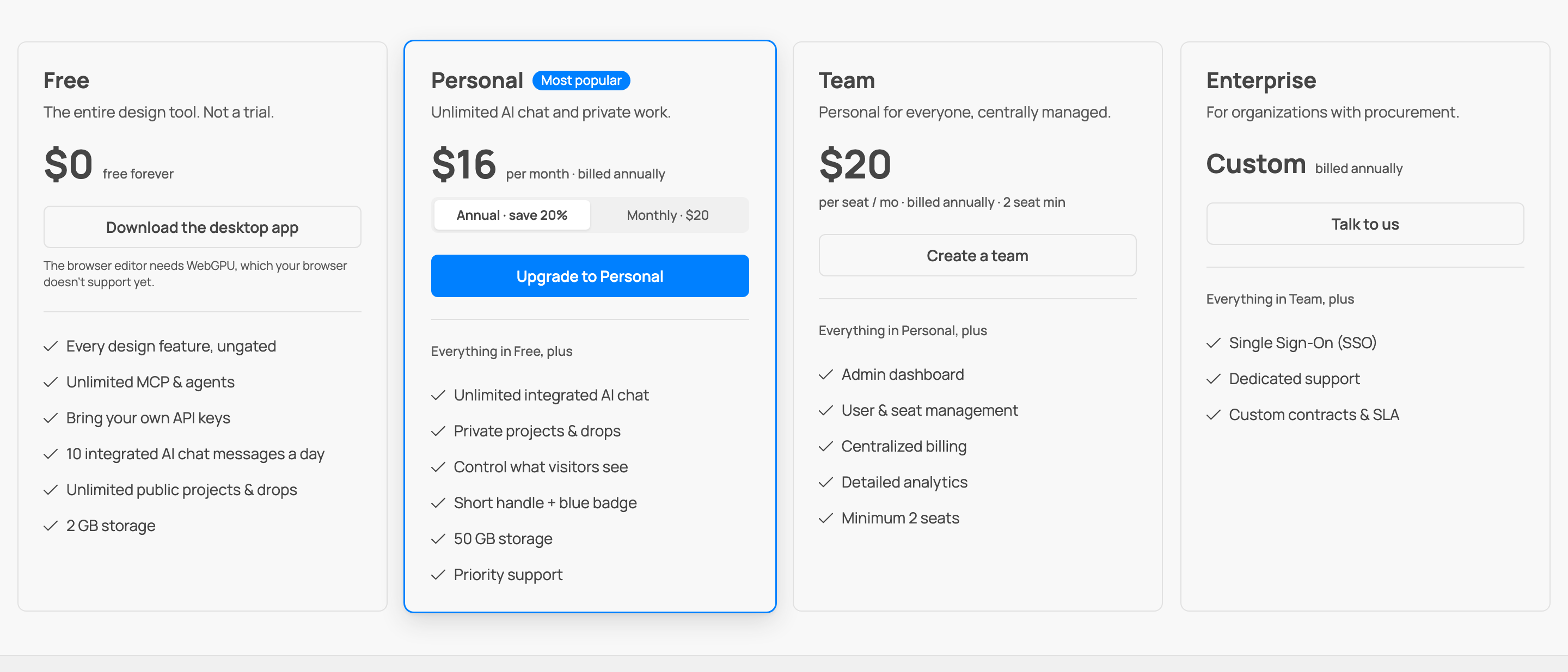
Full details and the current numbers live on the pricing page.
Storage
Your quota counts three things: the projects you own (a collaborator's edits count against the owner, not the editor), your drop payloads, and media like images and your avatar. Free personal accounts get 2 GB, and a paid Personal plan gets 50 GB. Team storage is pooled across the whole team rather than counted per seat: a paid team shares 1 TB, and a free team shares 4 GB.
To see where you stand, open web Settings, Plan & billing, which shows a storage meter. On desktop, Settings > Usage shows your Brilliant AI usage and your daily count on your own AI; storage lives on the web.
At the cap, the behavior is safe and predictable:
Saves are refused, cleanly. Nothing is half-written. You will see a plain message like "Storage full: 2.1 GB of 2 GB used."
Viewing, exporting, and deleting always work. You are never locked out of your own work.
Deleting frees space immediately. Remove something and the room comes back at once.
In a live session, hitting the cap does not kick you out: your edits stay live, they just cannot be saved into the project's history until you free space or upgrade.
Billing mechanics
Checkout runs through Paddle. A Personal purchase completes inside the editor (a checkout page on the same overlay as sign in, hosting Paddle) and the plan flips live, continuing the message you were holding; a switch between paid rungs happens in place on the plan sheet (or on your plan card in web Settings > Usage); team plans finish in your browser and the app updates itself once you are done. The wall shows the plan's monthly price; usage is never quoted in dollars.
You can cancel any time. A cancellation keeps your plan active until the end of the period you already paid for, then drops you to Free. Your invoices are in Settings.
How team billing behaves
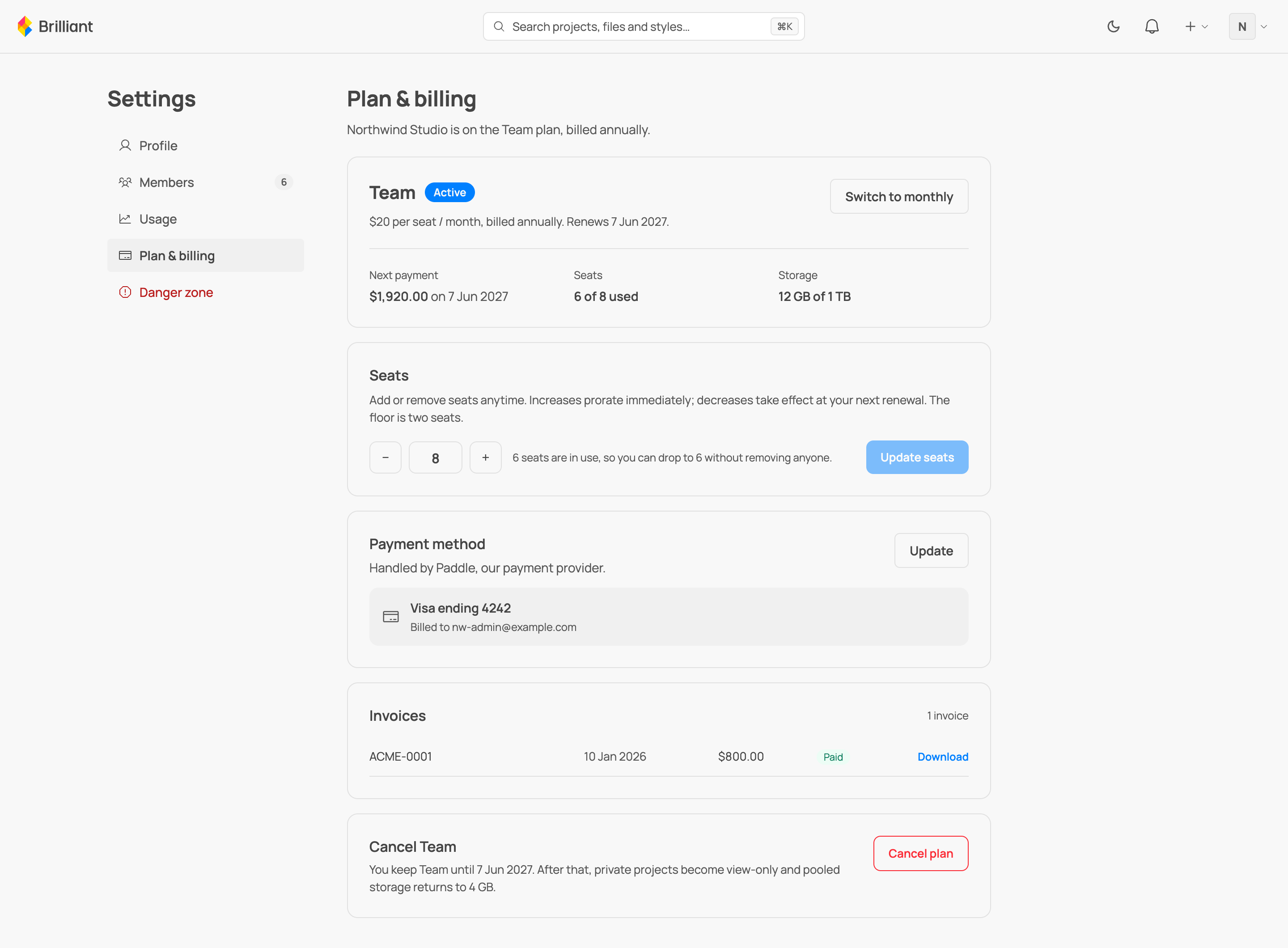
A team's plan is managed from its Plan & billing settings, which only admins can open. It works like the personal plan, with a few things that are specific to buying seats for a group.
Seats prorate one way and defer the other. A team pays per seat, with a two-seat minimum, and you can change the count at any time. Adding seats takes effect immediately: the proration is billed to your card right away and the new seats are usable at once. Removing seats is deferred: nothing is billed now, your current seats stay until your next renewal, and the lower count takes effect then. You can never drop below two seats, or below the number of people already seated, whichever is higher.
Plans are monthly only. New subscriptions, personal and team, bill monthly; the annual option was retired in 2026. A team already on an annual cycle keeps it until it chooses otherwise.
A failed payment gets a grace period. A failed renewal does not cut the team off. The plan enters a grace period in which everything keeps working, and the billing page shows when access ends along with a way to update the card. Fix the card in time and nothing changes. If it is not fixed, at the end of the window the team drops to Free: private projects become view-only and the pooled storage tier falls to 4 GB. Nothing is ever deleted, and updating the card or resuming the plan restores everything.
Invoices. Every charge is listed on the billing page with its date and amount and a link to download the invoice. There is one invoice for the whole team, not one per member.
Pooled storage. Team storage is pooled: every team project draws from the same quota, shared across the whole team, while each member's personal projects keep their own separate quota. The team's Usage settings show the pool as a whole (1 TB on a paid team, 4 GB on a free one) and a per-project breakdown, so an admin can see which projects use the most space, each with its visibility, canvas count, and size.
What happens if you downgrade
A downgrade removes capability. It never destroys your work and never exposes anything that was private:
Private projects and drops become view-only. You can still read, export, or delete them, and you can flip any of them public to resume free editing instantly. Nothing is deleted.
Storage returns to 2 GB. Bytes you already have stay put. If that puts you over the 2 GB line, you cannot save new changes until you free space, but everything already there is safe and you can always delete to make room.
A short handle reverts at once to the handle you had before you claimed it. The short handle is then reserved for your account for 30 days (see handles and profiles): nobody else can claim it, links keep redirecting, and re-subscribing within the window restores it to you automatically, with no reclaim step. Claiming a brand-new short handle still needs a paid plan.
The blue badge disappears.
Brilliant AI returns to Free: the monthly Free allowance, and the 10-a-day cap on your own AI comes back.
That is the whole list. A lapse takes away the paid extras and leaves everything else exactly as it was.
Next
Why the built-in chat earns the upgrade: Why pay for the integrated AI chat.
The private work you are paying for: Publish a project.