Design System Overview
Brilliant has a built-in design token system. Tokens turn the values you use over and over (your brand color, your default corner radius, your body font size) into named decisions you can change in one place and watch propagate.
This page is the gentle tour. The next pages cover authoring details, every token type, and modes/brands.
Why use tokens
Two reasons it's worth caring about, and they show up immediately when you start using them.
Change once, update everywhere. Suppose your brand color is #0080FF and you've used it on twenty buttons across thirty canvases. With raw hex values, swapping it to a new color means twenty edits. With a token, you call your color primary.mid once in the design system file and reference primary.mid on every button. Update the brand seed in one line, all twenty buttons follow.
Semantic naming. A button styled with color.text.error says what it's for, not what color it happens to be. When you later swap "error" red to "error" orange, the meaning stays right. The element still represents an error state, the color just changed.
Brilliant handles the hard parts: generating an 11-step OKLCH color ramp from one seed, light/dark theming, brand variants, cascade across folders. You write a few lines, you get a full design system.
See it in motion
Here's the payoff, live. One card, one design system, three controls: brand, theme, and density. Flip any of them and every value the system drives moves at once. That is what tokens buy you: change the system in one place, the whole design follows.
The rest of this page is how that system is built. Those three controls are quietly swapping the pieces below.
Where it lives
Each project has a Styles/ folder at the root with two files inside:
my-project/
├── Styles/
│   ├── default.ds               ← you edit this
│   └── .gen/
│       └── default.gen.yaml         ← auto-generated, don't edit
└── Canvas.blStyles/default.ds is the file you edit. It contains your design system: which colors, which spacings, which typography, which shadows. Brilliant writes a fully-populated version when you open a fresh project, so you can poke around immediately.
Styles/.gen/default.gen.yaml is the resolved output. Brilliant regenerates it every time you save the source, expanding everything to concrete values. External tools (Style Dictionary, Tokens Studio plugins, build scripts) read it. Don't edit it: your changes get overwritten on the next save. It's added to .gitignore automatically.
Primitives vs semantics
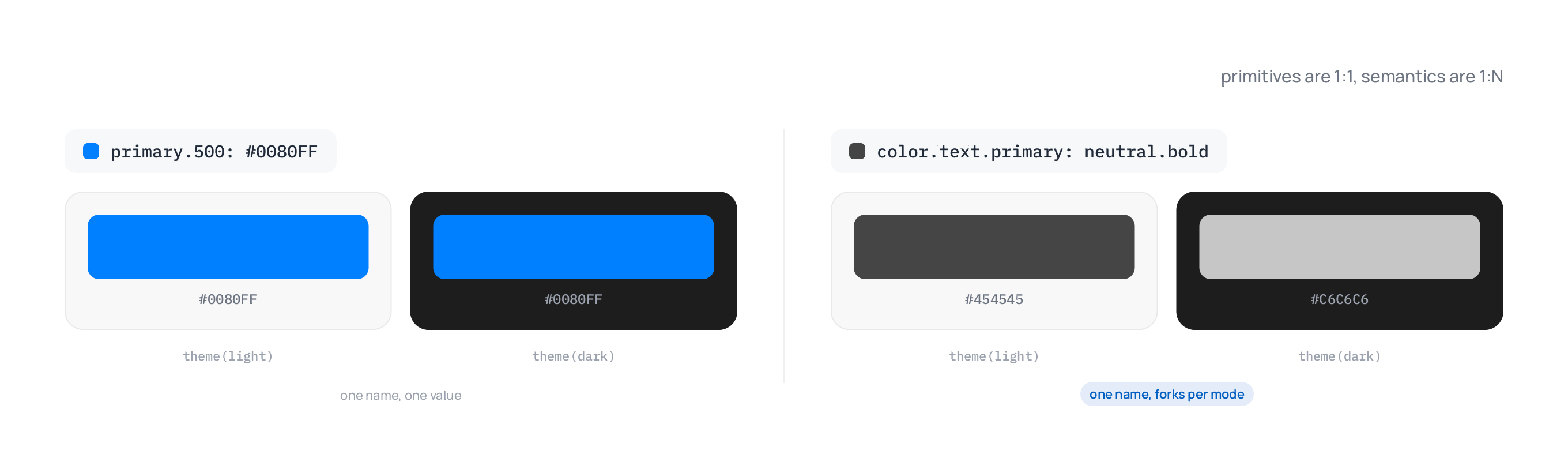
The central mental model: primitives are 1:1 mappings (one fixed value), semantics are 1:N mappings (mode-aware, one value per mode).
Primitives are the author-layer building blocks. They produce raw stops like
primary.50..950,spacing.1..32,font.weight.1..9. Same value in every mode.Semantics are the agent surface. They produce mode-aware role names like
primary.mid,spacing.md,font.weight.bold. The same name resolves to different values in light vs dark, comfortable vs compact, etc.
When you reference a token in a blueprint or property, you almost always use the semantic name ($primary.mid, $font.size.lg). The primitive stops are still resolvable if you need a specific value pinned across all modes.
Five generators
The DSL has five built-in generators. Two produce primitives; three produce semantics.
Primitive generators:
color(seed)                  // 11-step OKLCH lightness ramp → .50, .100, ..., .950
number(seed, count, ramp)    // generate N values from a seed using a ramp
number(range(min, max), count, ramp)
                             // generate N values bounded by min/max
number([stops...]) // explicit list of stops → .1, .2, ..., .NSemantic generators:
boldness(scale)              // 9 mode-aware stops:
                             //   hint, faint, subtle, soft, mid, firm, bold, strong, intense
tshirt(scale, [min], [max])  // variable t-shirt stops:
                             //   xs, sm, md, lg, xl, 2xl, 3xl, ..., NxL
                             // plus optional named boundary stops
looseness(scale)             // 6 mode-aware stops:
// none, tight, snug, normal, relaxed, looseThe semantic generators wrap a primitive scale and produce role-keyed outputs that flip per mode automatically.
Two kinds of declarations (plus composites)
Open default.ds and you'll see two main kinds of statements, primitives and semantics, plus a third structured form for typography and shadows.
1. Primitive seeds
A primitive declares a fixed value, or a fixed scale of values. The same primitive resolves to the same thing in every mode.
Single value. One line, one value:
font.family: Manrope
brand:       #0080FF
brand.300: #B8B9D6Generated ramp. Wrap a seed in color(...) or number(...) to expand it:
red:     color(oklch(63.7%, 0.237, 25.331))   // → red.50..950 (OKLCH ramp)
spacing: number(4, 32, linear())               // → spacing.1..32 (linear scale)
weight:  number([100, 200, 300, 400, 500, 600, 700, 800, 900])
// → weight.1..9 (explicit list)$primary.500 is the same hex in light and dark; $neutral.50 is always near-white. Tailwind-style.
2. Semantics: mode-aware resolvers
A semantic wraps a primitive scale in boldness(...), tshirt(...), or looseness(...). The output is role-named (mid, lg, normal, etc.) and flips per mode:
primary:     boldness(color(#0080FF))           // → primary.{hint..intense}
spacing:     tshirt(number(4, 32, linear()))    // → spacing.{xs..6xl}
font.weight: boldness(number([100, 200, 300, 400, 500, 600, 700, 800, 900]))
                                                // → font.weight.{hint..intense}
font.lineHeight: looseness(number([1.0, 1.25, 1.375, 1.5, 1.625, 2.0]))
// → font.lineHeight.{none..loose}Mode behavior is carried by default: each generator applies the catalog's default transforms unless you override them with a transforms: { ... } argument or opt out with transforms: none. Those defaults are theme.dark: mirror on color seeds (so primary.hint reads near-white in light, near-black in dark), density.compact: shift(-1) and accessibility.large-text: shift(+1) on the t-shirt scales, and so on. They live in the catalog, not the seed file. See Modes & brands for the full op vocabulary (shift(N), mirror, outward(N)).
Semantics can also be aliases that just point at another resolved value. These are the chrome roles (surface, text, borders):
color.primary:         primary.mid
color.surface:         neutral.hint
color.text.primary:    neutral.bold
color.shadow: neutral.950 // primitive stop = mode-immuneWhen a role doesn't need to flip per mode, the bare alias is enough. Reach for an explicit block when you want to override per mode:
color.text.primary {
  $default:                    neutral.bold
  accessibility.high-contrast: neutral.950
}3. Composites: structured tokens
Composites bundle multiple fields into one named unit. The two built-in kinds are typography and shadow.
Typography composite. A record of font properties:
typography.h1: { fontSize: font.size.3xl, fontWeight: font.weight.bold, lineHeight: 1.2 }Ask the agent in the chat to apply it ("set the selected text to typography.h1") and it sets all the fields in one go. Edit the composite, switch brand, or switch mode, and every text using it follows. A hand edit of one of those fields detaches that text from the composite.
Shadow composite. A list of layers:
shadow.md: [
  drop(y: 2, blur: 4, spread: -1, color: rgba(0, 0, 0, 0.06)),
  drop(y: 4, blur: 6, spread: -1, color: rgba(0, 0, 0, 0.10)),
]The drop(...) function describes a single drop-shadow layer. Multi-layer shadows (the kind that look believable) are just a list. To apply one, ask the agent in the chat ("give the selected card shadow.md"). It replaces the element's existing drop shadows and keeps its inner shadows, glows, and blurs.
Vocabularies
Three uniform vocabularies the semantic generators produce. Same words used across every domain they apply to.
| Vocabulary | Stops | Used by |
|---|---|---|
| boldness (9) | hint, faint, subtle, soft, mid, firm, bold, strong, intense | Color tones, font weight, stroke width, visibility |
| tshirt (variable) | xs, sm, md, lg, xl, 2xl, 3xl, ..., NxL | Spacing, radius, font size |
| looseness (6) | none, tight, snug, normal, relaxed, loose | Line height, letter spacing |
For color scales, mid is the bare alias: $primary resolves to $primary.mid (the step-500 tone). This is the canonical "the default version of this scale" reference. Only color seeds and font.family get a bare form, though. Number-backed scales have no bare token, so always name a stop: write $spacing.md, never a standalone $spacing. For the t-shirt-backed ones (spacing, radius, font size) the center role is md, not mid; the boldness- and looseness-backed ones (font.weight, stroke.width, font.lineHeight, and friends) keep their own centers, mid and normal.
Editing the file
The fastest way to open the design system is the Open Design System File command in the command palette. It opens Styles/default.ds in Brilliant's built-in code editor with syntax highlighting.
You can also edit it externally, in VS Code or any other editor. Brilliant watches the file for changes and regenerates the resolved output as soon as you save. Edits show up on the canvas in real time.
For most day-to-day changes (picking a different brand color, tweaking spacing) you don't need to open the file at all. The right toolbar's color picker, spacing inputs, and so on let you bind properties to tokens with a click.
What's next
Authoring: the full grammar reference. Every generator and form in detail with examples.
Tokens: every token type, the built-in defaults, and what to use which for.
Modes & Brands: light/dark theming, custom mode axes, and managing multiple brand variants.
default.ds and want the built-in defaults back, run the Reset Design System command: it rewrites Styles/default.ds with Brilliant's seed template, the same content a fresh project starts with. It's undoable with ⌘Z, so you can back out if you changed your mind.