A professional Figma alternative that is free, local-first, and agent-native.
Brilliant is a full professional design tool in the Figma mold: auto layout, components, vector editing, tokens, effects. The whole editor is free, your files live on your own disk in plain text, and a team of AI agents works on the same canvas.
The whole editor, free
Design by hand and you get near-complete feature parity with Figma: the same primitives, the same muscle memory, the same final output. Every capability below is in the free tier.
- Auto layout
Direction, spacing, hug, fill, and fixed sizing, layout grids, clip content, and masks.
- Components and variants
Masters and instances, overrides and syncing, component sets with variants and properties, slots, and cross-canvas instances.
- Vector and pen
Pen and pencil tools, a full vector edit mode, node and handle types, region fills and edge strokes.
- Design tokens
A Styles source compiling to eleven-step OKLCH ramps from one seed, light and dark theming, modes and brands, and a resolved file Style Dictionary and Tokens Studio can read.
- Effects and shaders
Drop shadow, glows, blurs, and blend modes, plus six animated GPU shader fills and seven filter fills as first-class canvas fills.
- Ten export formats
PNG, JPEG, WebP, SVG, PDF, HTML in three flavors, React JSX, MP4, MOV, and Replay.
Your designs, your disk, your git
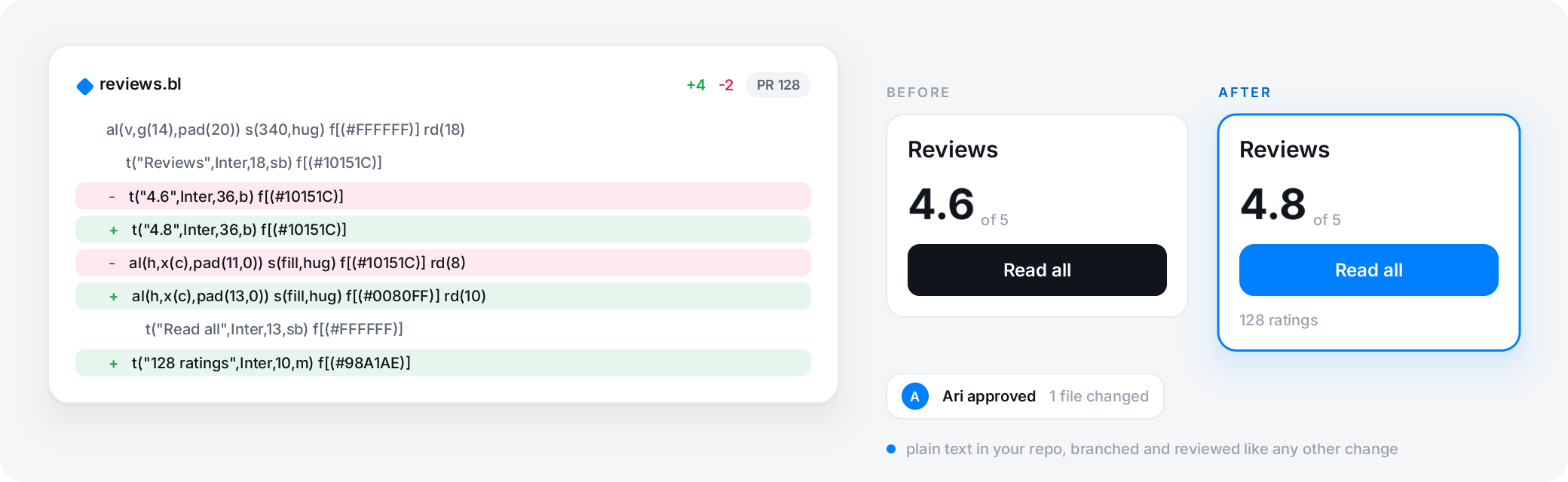
A Brilliant workspace is a folder on your disk. Each canvas is a plain-text Blueprint file ending in .bl: one element per line, stable ordering, inline coordinates, hex colors. There is no hidden project database, and nothing uploads until you choose to publish.
Because the file is plain text, it diffs cleanly in git without unzipping. Branch a canvas to try a direction, commit the experiment, revert it if it does not work out, and run git blame to find the commit where the hero color drifted off brand. Open, inspectable file formats exist elsewhere too, but a line-by-line git diff without unzipping is the property that makes designs behave like code.
Agents on the same canvas
Brilliant runs a local MCP server the whole time the app is open, and a built-in AI chat is docked in the bottom toolbar. Point Claude Code, Cursor, or any MCP client at it and it designs alongside you: it creates native editable elements, edits any canvas, and runs over a hundred canvas commands, each with full undo.
Brilliant AI is included on every plan; or bring your own provider (Anthropic, OpenAI, Google, OpenRouter, or a Claude Code or Codex subscription) and pay it directly at zero markup. MCP is unlimited on every plan, including Free, except an image an agent generates on Brilliant AI, which draws on your Brilliant AI usage and is capped like the chat's.
Figma import, both ways
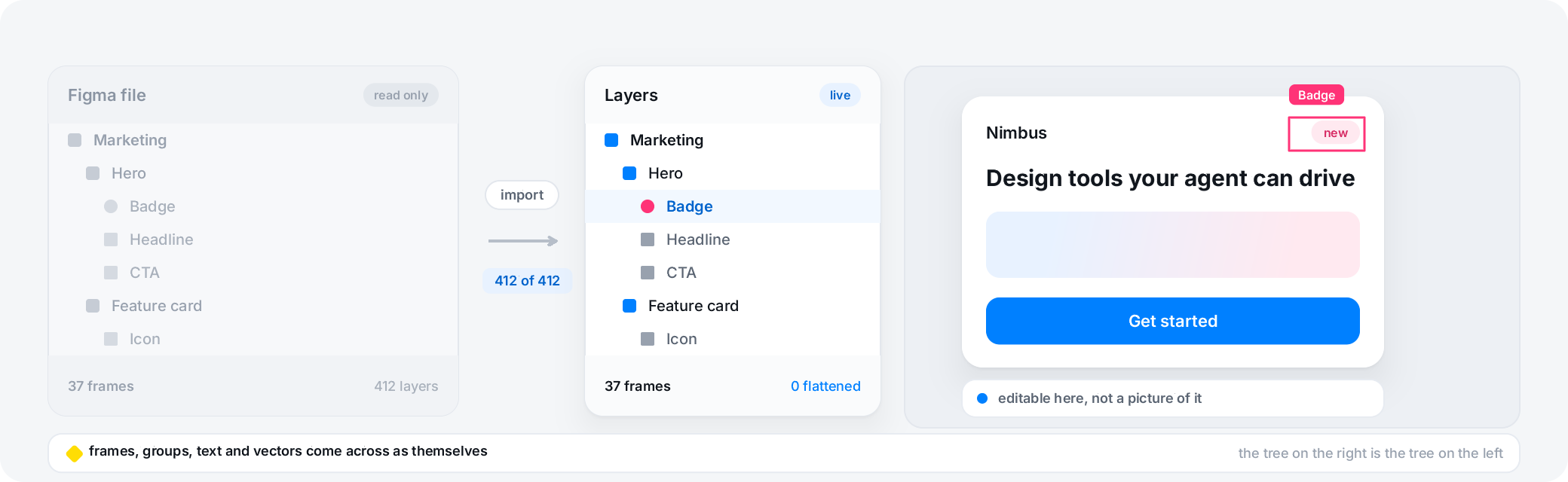
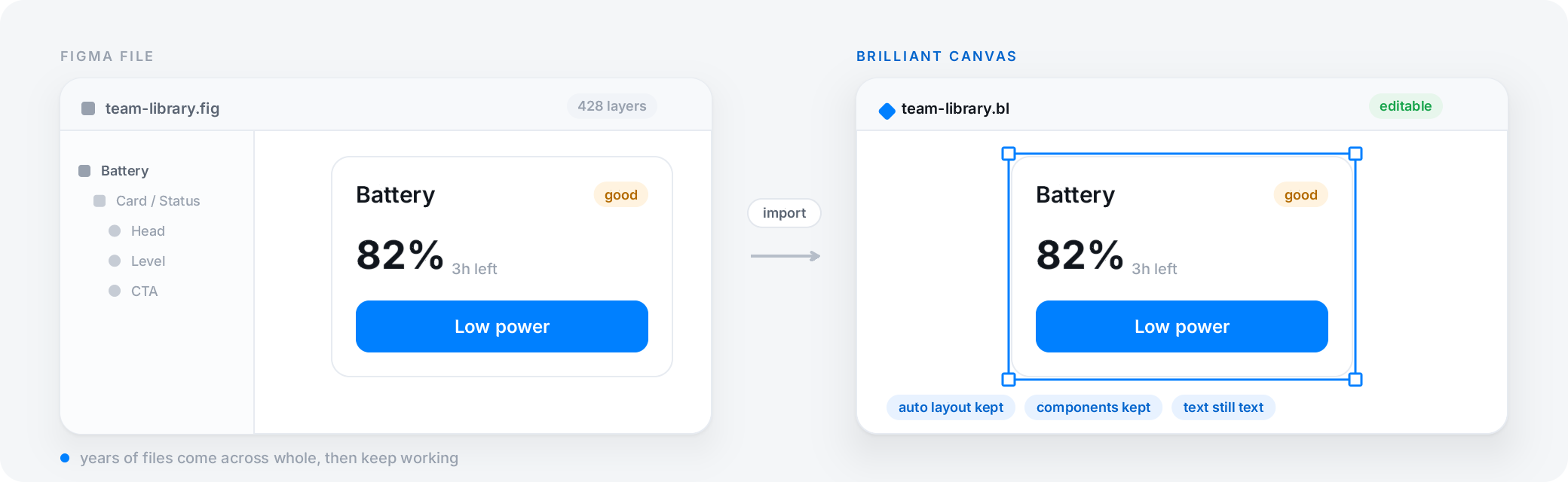
Switching is reversible. Import from Figma by file URL, by page, or by node-id subtree, or through the Brilliant Figma plugin. Auto layout, frames and groups, vector paths, boolean operations, gradients and image fills, strokes, shadows and blurs, text with per-character overrides, and components and instances with the master link preserved all carry over. Interactive prototypes, non-variant component properties, and Figma Variables bindings do not; the resolved values of bound styles do come through.
When you want to go the other way, Brilliant sends designs to Figma through the paired Brilliant Figma plugin, and it can also save as a Sketch file. Your work is never trapped in one tool.
The honest gaps
One capability Figma ships that Brilliant hasn't shipped yet is interactive prototyping. Brilliant is a fully editable static canvas today, with prototyping on the roadmap, and every frame, component, variant, and token you'd build a prototype from is already here at parity. If a click-through prototype is the one artifact your week turns on, that single step still lives in Figma; everything around it is here, with agents on the canvas, plain-text files in git, and native GPU shaders that Figma doesn't have.
Two smaller notes, stated plainly. Brilliant's token system is a first-party DSL rather than the W3C DTCG standard, and it compiles OKLCH ramps, modes, and brands to a resolved file Style Dictionary and Tokens Studio read. And a handful of Figma constructs simplify on import: diamond gradients flatten to their first stop's color, and very complex SVGs may need cleanup.
Frequently asked questions
Is Brilliant really free?
Yes. The entire design tool is free forever: auto layout, components, vector editing, design systems, effects, shaders, all ten export formats, Figma import, and MCP with unlimited canvas work (images on your Brilliant AI usage). It is not a trial and no feature is removed over time. Brilliant charges for private work and for more Brilliant AI usage (a monthly plan), never for the act of designing; your own AI is 10 messages a day on Free and unlimited on any paid plan.
Can I import my Figma files, and what carries over?
Yes, by file URL, by page, by node-id subtree, or through the Brilliant Figma plugin. Auto layout, frames and groups, vector paths, boolean operations, gradients and image fills, strokes, shadows and blurs, text with per-character overrides, and components and instances with the master link preserved all carry over. Interactive prototypes, non-variant component properties, and Figma Variables bindings do not, though the resolved values of bound styles do come through.
Can I go back to Figma later?
Yes. Brilliant sends designs to Figma through the paired Brilliant Figma plugin, and it can also save as a Sketch file. Your work is never trapped, because each canvas is a plain-text .bl file on your own disk.
Does it run offline, and on which platforms?
Brilliant is a desktop app for macOS, Windows, and Linux, plus a web editor. Because a workspace is a folder of plain-text files on your disk, with autosave and no upload until you publish, your local designs stay with you.
How do the AI agents fit in?
Two ways. A chat is built into the bottom toolbar, and a local MCP server lets any external agent such as Claude Code, Cursor, or Codex drive the canvas. Either way the agent creates real, editable vector elements and runs the same commands you do, each with full undo. It runs on Brilliant AI by default or on your own AI, and external agents over MCP are unlimited on every plan, except an image an agent generates on Brilliant AI, which draws on your Brilliant AI usage and is capped like the chat's.
How does Brilliant compare to Figma on prototyping and multiplayer?
The hand-design editor is at near-complete parity: auto layout, components and variants, vector editing, tokens, effects, and export all match. The one capability Brilliant hasn't shipped yet is interactive prototyping, which is on the roadmap; Figma's multiplayer and plugin ecosystem are also longer-established, while Brilliant runs multiplayer on published projects and opens its canvas to any agent over MCP.
Related
A full professional design tool that doesn't ask for rent, with agents on the canvas and your files in git.