Brilliant for founders and small teams
Design is usually the thing you skip because there's nobody to do it. Brilliant is free: the whole tool, not a trial or a stripped-down tier. Auto layout, components, vector editing, effects, design systems, tokens, GPU shaders, ten export formats, Figma import, and MCP with unlimited canvas work (images on your Brilliant AI usage), on macOS and Windows.
The agent does the first draft. You do the taste.
Start from a sentence
Press / on the canvas, describe the outcome, and the agent builds it as native, editable elements: pages, dashboards, illustrations, diagrams, wireframes. Then you keep talking to it.
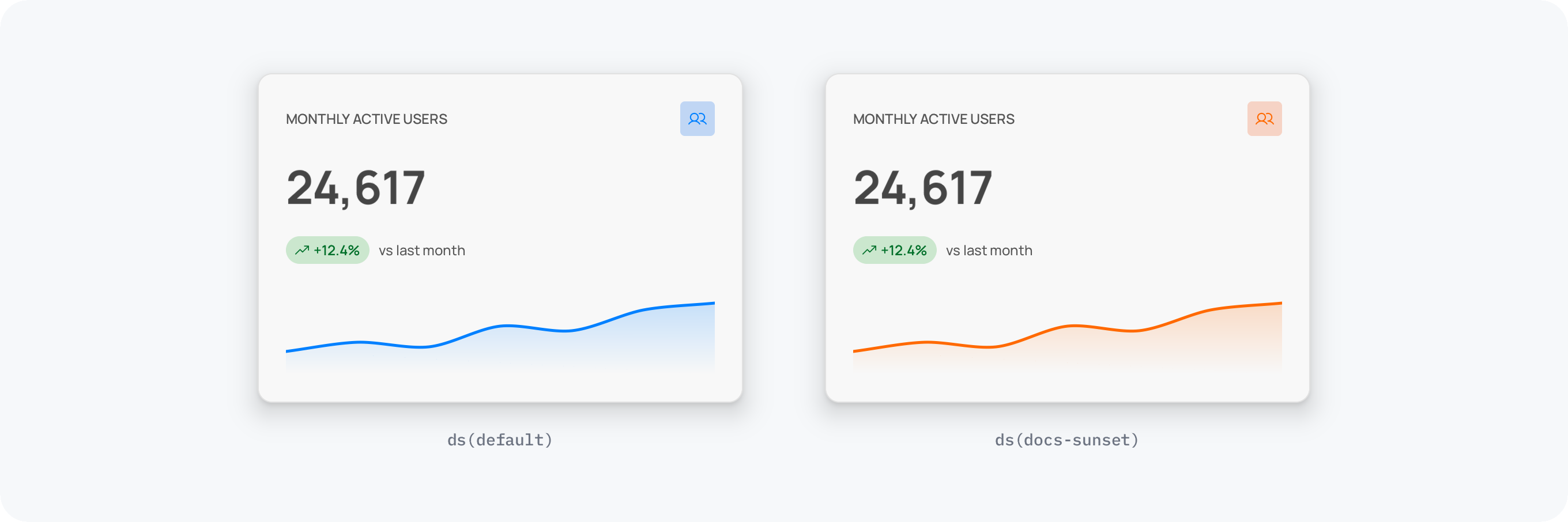
Build a dashboard stat card: a small label, a big metric number, a trend indicator, and a sparkline area below.
Nothing is flattened to an image, so when something is 80% right you fix the last 20% by hand instead of re-prompting forever.
Haven't connected a model? You don't need to: your first message runs on Brilliant AI. Playground, a toggle in Settings, replays bundled demo conversations if you'd rather watch first.
On-brand before you have a brand
Every fresh project ships with a fully populated design system: colors, spacing, radius, type, all already wired. Ask the agent to use your tokens and it paints surfaces with roles like color.surface instead of hard-coded hex.
The payoff shows up the day you change your mind about the brand. Switch the theme or brand dropdown in the right toolbar and every screen re-skins at once. You can even have the agent author the new brand: "add an alternate brand called sunset with a warm orange primary" writes a sparse file into Styles/ and flips the canvas over to it.
Ship it somewhere
Export the selection to PNG, JPEG, WebP, SVG, PDF, HTML, React, MP4, MOV, or Replay. Copy a section straight to the clipboard as HTML, React, CSS, or an image and paste it into your codebase or a thread.
Or publish. A project goes live at brilliant.design with one toggle, and the link lands on your clipboard. Public is the default and it's free. Investors, contractors, and early users open the real editor in a browser, view-only, and can copy pieces out.
When you do bring someone in, invite them by email or @handle as a viewer or an editor. Editing is genuinely simultaneous: presence avatars show who's around, colored cursors show where they're working, and two people on different parts of the canvas never block each other. On a public project that costs nothing.
Already have assets somewhere? Figma files import directly, by pasting a file URL or through the Copy to Brilliant plugin, and Sketch files import too. You don't start from an empty canvas just because you started from another tool.
What it costs
The design tool is free forever, with no per-seat charge. Two things are paid: more built-in AI, and keeping work private (private projects, private drops, share links). The AI comes two ways: Brilliant AI, the default, included with every plan (Free includes it every month; paid plans raise it in multiples of the base), or Your own AI (your own keys and coding agents), with zero markup and a 10-a-day cap on Free that any paid plan lifts. Driving Brilliant from an external agent over MCP is never capped.
That shape is deliberate: free is for working in public, paid is for working in private. If your early work can live in the open, a small team can run on Brilliant without a line item.
The honest part
You still need judgment. The agent produces professional structure, auto layout, components, tokens, effects, but it doesn't know your positioning or which of three directions is the right one. Brilliant is also a static canvas today, with click-through prototypes on the roadmap. And the built-in AI beyond the Brilliant AI Free includes every month and the 10-a-day cap on your own key is a paid feature: more Brilliant AI usage comes with the monthly plans, and your own AI is unlimited on any paid plan.
A couple of platform edges are worth knowing before you plan around them: video export runs on macOS and Windows only, transparent video is macOS only, and the web editor needs a WebGPU-capable browser (Chrome, Edge, Safari 26 or later, or Samsung Internet).
Next
Get it running: Download & Install.
Build something end to end: Design tutorials.
Make it look like you: Design system overview.
Put it online: Publish a project.