A design tool for Claude Code
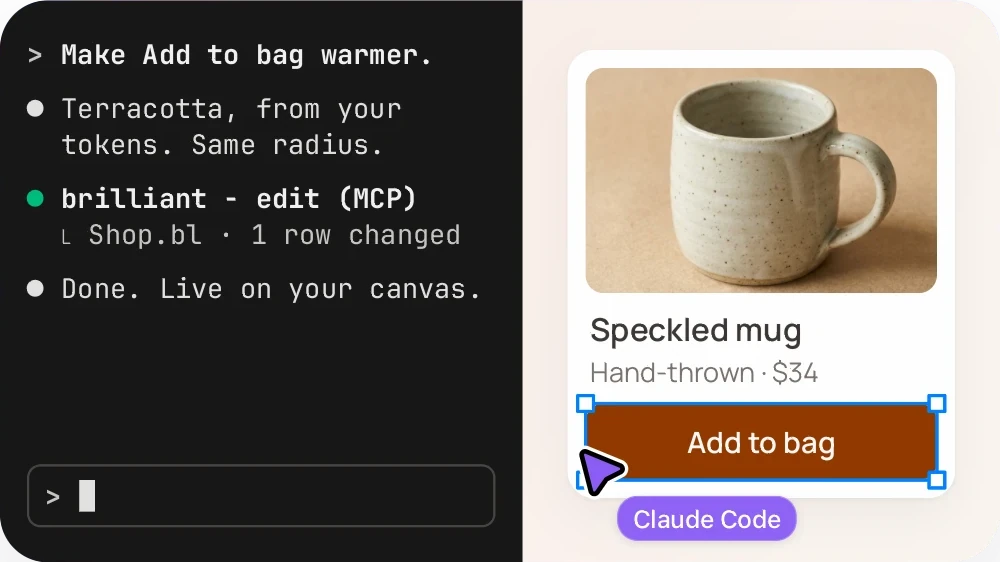
Claude Code writes good code and guesses at design. Brilliant gives it a real canvas. Run one command, ask for a screen, and Claude lays it out as frames, auto layout, components and text that you can then drag, retype and restyle by hand. Claude reads your changes and keeps going.
On this pageHow do I connect Claude Code to Brilliant?
How do I connect Claude Code to Brilliant?
One command. It needs Node 20 or later and no API key.
- Run the command.Paste it into your terminal. Claude Code adds Brilliant as an MCP server.
- Ask for a screen.Ask Claude Code for a design, for example: Design a three-tier pricing section in Brilliant.
- Pair the canvas.When Claude calls Brilliant, brilliant.design opens in Chrome, Edge or Firefox and pairs with it. Allow the one-time local network prompt. If the Brilliant desktop app is running, Claude uses it instead.
claude mcp add --scope user brilliant -- npx -y @brilliant-hq/mcpPrefer the plugin? `claude plugin install brilliant-design --marketplace brilliant-hq/brilliant-mcp` adds the MCP server plus design skills.
What can Claude Code do on the canvas?
Everything the editor does.
What can I do by hand afterwards?
Everything Claude makes is a real, editable element, never a flattened image.
| Drag | Move and resize frames, and change their auto layout. | |
|---|---|---|
| Retype | Edit any text where it sits. | |
| Restyle | Change colors, fills, strokes, effects and components. | |
| Undo | Each command can be undone, so a wrong move is one keystroke back. | |
| Hand it back | Claude reads your changes and keeps going from them. |
What does it need?
Node 20 or later, for the helper the command installs. A browser canvas in Chrome, Edge or Firefox. Safari cannot run the browser canvas.
Or the Brilliant desktop app for macOS or Windows, which serves MCP on your machine while it is open. The helper and the desktop app serve MCP on your own machine, so your design does not reach Brilliant over them, except an image generated on Brilliant AI and background removal.
Connect an agent, every clientWhat does it cost?
Brilliant has a Free plan, and canvas work by your own agents over MCP is unlimited on every plan, Free included. An image an agent generates on Brilliant AI uses your Brilliant AI usage.
See pricingQuestions
How do I get Claude Code to design a UI?
Connect Brilliant with one command, claude mcp add --scope user brilliant -- npx -y @brilliant-hq/mcp, then ask Claude Code for the screen you want. Claude lays it out on a real canvas as frames, auto layout, components and text, and you can edit every part of it by hand.
How do I make a mockup with Claude Code?
Connect Brilliant, then ask for the mockup, for example: Mock up a mobile login screen in Brilliant. Claude builds it as editable layers. Move and restyle it by hand, ask for the next version, and export PNG, SVG, PDF, HTML or React when it is ready.
Can Claude Code make a poster?
Yes. With Brilliant connected, ask Claude Code for a poster at the size you need. Claude lays out the text, shapes and images as editable elements, and you export it as PNG, PDF or SVG.
Do I need an API key?
No. The helper needs Node 20 or later and no API key.
Is it free?
Yes. Brilliant has a Free plan, and canvas work by your own agents over MCP is unlimited on every plan. An image generated on Brilliant AI uses your Brilliant AI usage.
Claude Code already writes your code. Give it a canvas.